Design your own
Bring your own mail piece: a design an AI writes as HTML, or finished art from an image tool or a designer. You do not need to have done direct mail before. There are three steps. To start from one of Xcel's designs instead, see the template gallery. To lay a piece out in your browser, with no file and no HTML, open the designer in the partner console.
Step 1: Pick a size and download
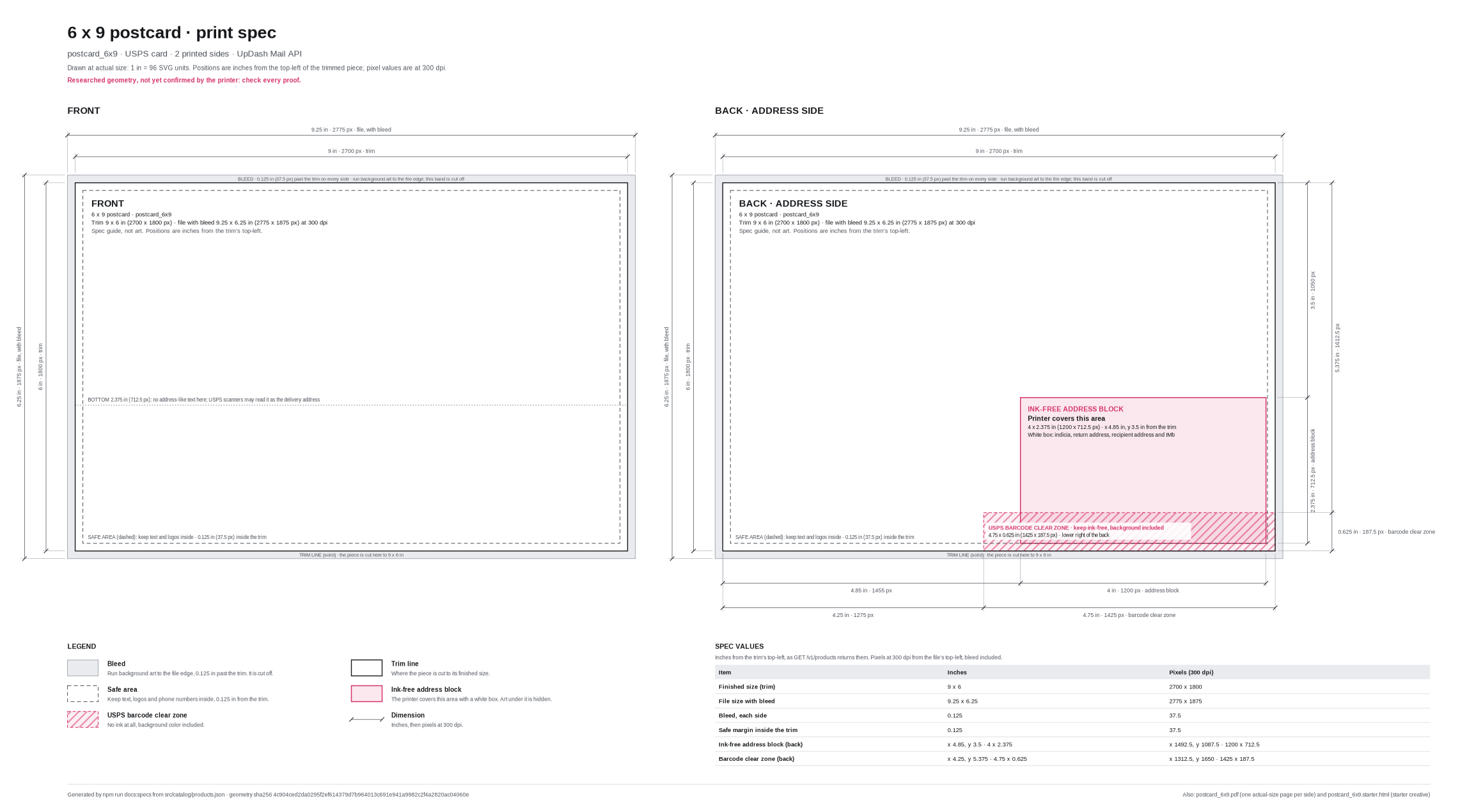
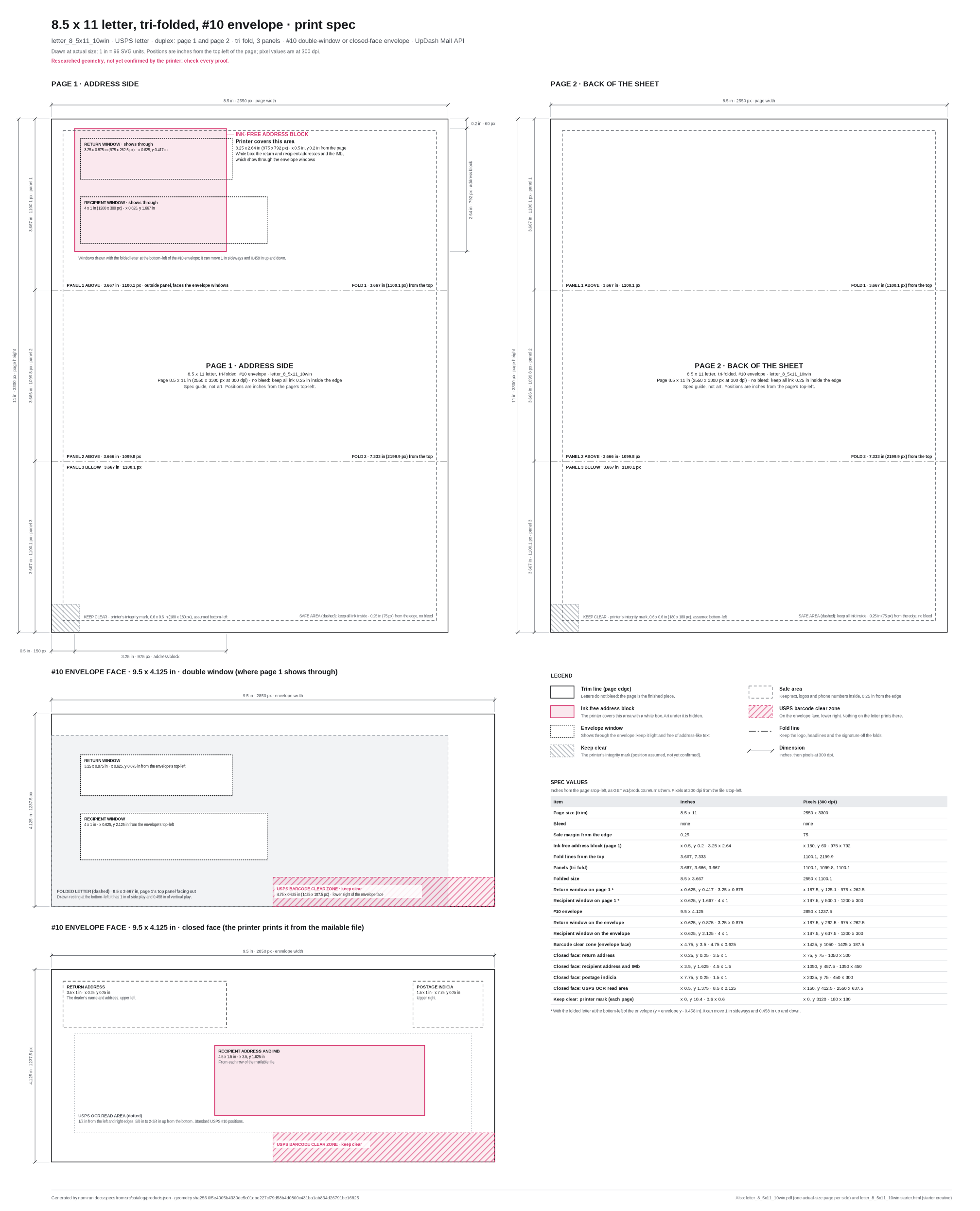
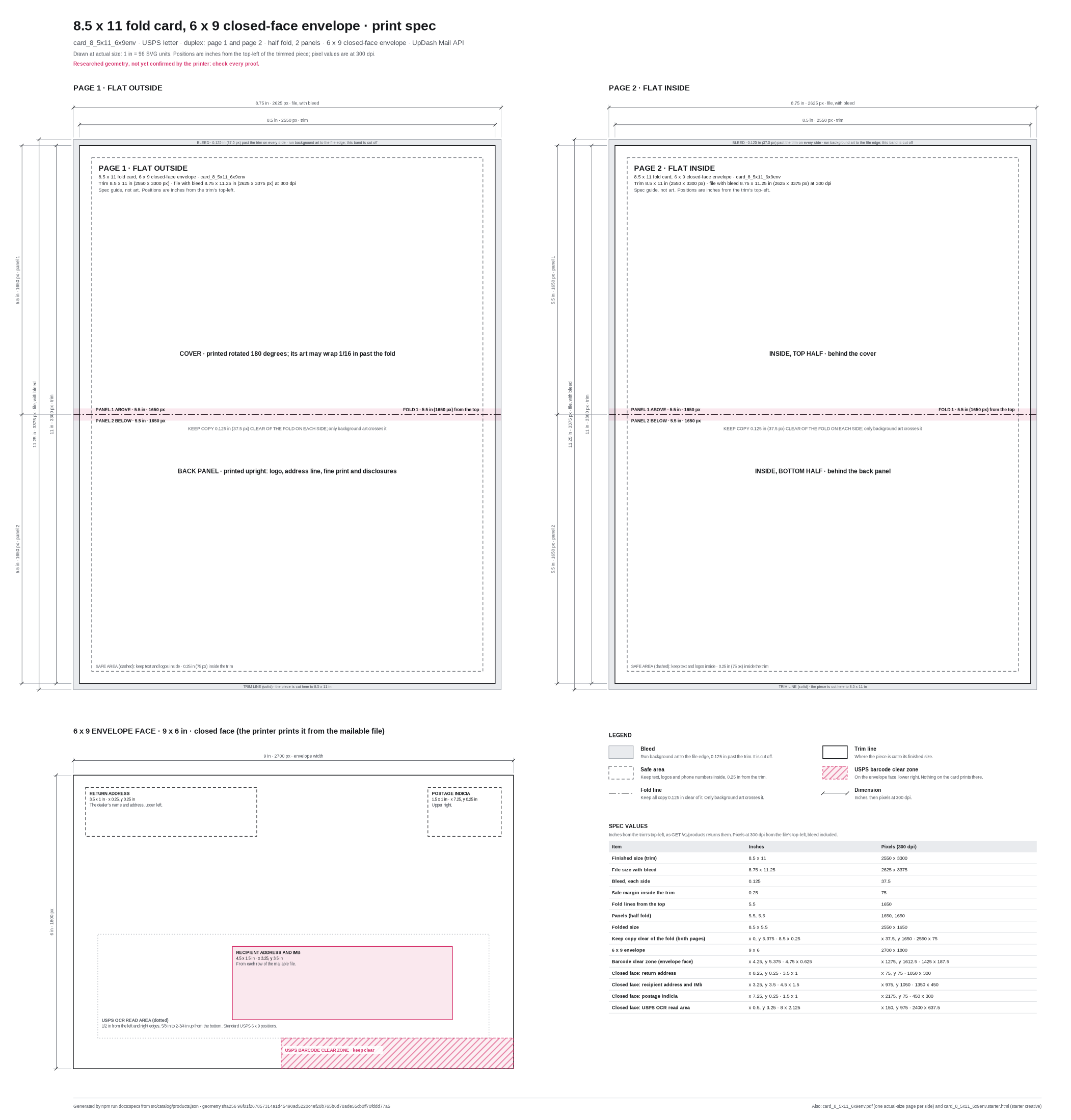
Download the blank file for your size. It has the page size, the areas to keep clear and the merge fields in place, and no sales copy to delete. The spec sheet shows the same areas at actual size.
| Size | Finished | Blank file | Spec sheet |
|---|---|---|---|
| 6 x 9 postcard | 9 x 6 in | Blank HTML | PDF, SVG |
| 8.5 x 11 letter, tri-folded, #10 envelope | 8.5 x 11 in | Blank HTML | PDF, SVG |
| 8.5 x 11 fold card, 6 x 9 closed-face envelope | 8.5 x 11 in | Blank HTML | PDF, SVG |
Step 2: Get an AI to design it
Open ChatGPT or Claude, attach the blank file, and paste the prompt for that size. Say what the piece is for at the top of the prompt, under MY BRIEF. Each prompt holds the sizes, the merge fields, what is refused, the fonts and the compliance rules, so the file that comes back passes the checks in step 3. Save its answer as an .html file.
For finished art, give the second prompt to an image tool or a designer. It gives the pixel sizes at 300 dpi and says what to leave white. The art prints exactly as sent, so every face, logo and word in it must be something the dealer owns the rights to.
Each HTML prompt also says how to mark a note data-hand, so proofs set it the way a person writes. Printed pieces set personalized handwriting in straight lines for now. Each one also says how to print the dealer's signature and photos with {{asset.*}} fields instead of pasting images into the file, and each recipient's own vehicle photo. The console's Building blocks show every one of these as it prints, with a snippet to copy. The fold card's prompts say what goes on each half of each page and what stays off the fold.
Make logos print through merge fields too, never pasted in: {{dealer.make_logos}} prints the logos of the makes the dealer sells, so no other brand's logo reaches a franchised dealer's piece. Where a logo sits on a dark background, mark the element around it data-tone="dark": the white logo prints there, and {{brand.logo}} prints the dealer's reversed logo (Light and dark backgrounds). To see each make's logos, or to place one yourself, use GET /v1/makes (Make logo files).
An agent connected over MCP can do all of this directly with save_template: see Your own templates.
6 x 9 postcard
Show the prompt
You are designing a printed direct-mail piece for a car dealership: 6 x 9 postcard. I attached a blank HTML file. Fill it in and return the whole file.

MY BRIEF
[Say here what the piece is for, who gets it, the offer and the look you want. For example: a service reminder for customers we have not seen in a year, with a free multi-point inspection, a handwritten note from our service manager, in our colors, clean and friendly.]

THE PIECE
Product: 6 x 9 postcard (postcard_6x9).
Finished size: 9 x 6 in.
Bleed: 0.125 in past the trim on every side, so each panel is 9.25 x 6.25 in. Background color and images may run to the panel edge; the outer 0.125 in is cut off.
Safe area: every word, logo and phone number stays inside x 0.25 to 9 in, y 0.25 to 6 in.
All positions here are inches from the top-left corner of the panel. Use CSS position:absolute with inches, inside each section.
Ink-free areas:
- Back, address block: x 4.975 to 8.975 in, y 3.625 to 6 in. The printer covers it with a white box and prints the return address, the recipient and the barcode there. Put nothing else in it. The file's <div class="xm-address"> goes on this panel, and the server places it: never give .xm-address a position or a size.
- Back, USPS barcode clear zone: x 4.375 to 9.125 in, y 5.5 to 6.125 in. No ink at all here, background color included. Keep that part of the panel white.
Front: keep anything that looks like an address out of the bottom 2.375 in. USPS scanners may read it as the delivery address.

THE FILE
- Exactly 2 sections, in this order: <section class="xm-panel" data-side="front"> (Front) then <section class="xm-panel" data-side="back"> (Back). All content goes inside them.
- Keep the blank file's <div class="xm-address"> with {{recipient.address_block}} on the Back.
- Keep {{brand.disclaimers}} and print it on every piece, never inside an {{#if}} block.
- Keep {{brand.logo}} wherever the dealer's logo belongs. Never draw or paste in a logo of your own.
- Put your CSS in one <style> element at the end of the file. Do not add <!doctype>, <html>, <head>, <body>, <meta> or <title>.
- The whole file must be at most 200,000 characters, embedded images included.
- Do not write a merge field inside an HTML comment.

WHAT WORKS IN THE MAIL
- One message and one offer. The reader decides in a few seconds whether to read on.
- The front is seen first: a short headline, one strong image and the dealer's logo. The back carries the note or the details, the offer and how to answer, beside the address.
- Make it personal: the first name, the vehicle and a handwritten note read as written for one person. Always give the fallback, so a piece with a blank name or vehicle still reads well.
- Make answering easy: the phone large, the website or a QR code that opens it, and why to act now in a copy field, such as {{copy.reason_to_act|Book this week}}.
- Body text 10pt or larger, disclosures 7pt or larger, dark text on a light background, and room around each thing.

MERGE FIELDS (write them exactly like this)
- A field is two curly braces around namespace.name: {{recipient.first_name}}. Text after a pipe prints when the value is empty: {{recipient.first_name|there}}. {{recipient.vehicle|your vehicle}} needs that fallback, since not every list has vehicle columns.
- recipient: first_name, last_name, vehicle, vehicle_year, vehicle_make, vehicle_model, city, state, zip, and the columns I name in my brief.
- dealer: name, address, address_line1, city_state_zip, make_logos, website, hours, service_hours, signer_name, signer_title. Print hours in an element with white-space:pre-line.
- brand: logo, logo_url, primary_color, secondary_color, accent_color, primary_ink, secondary_ink, accent_ink, primary_text, secondary_text, accent_text, disclaimers, phone, store_phone. {{brand.primary_color}} and the other *_color fields are the dealer's colors, so use them rather than fixed colors for brand elements; *_ink is the text color on a fill of that color, and *_text is that color made readable on white. The blank file sets them as CSS variables: var(--brand), var(--brand2), var(--brand-ink), var(--brand-text), var(--brand2-text).
- Conditional text: {{#if recipient.vehicle}}...{{else}}...{{/if}}. Also {{#unless x}} and comparisons such as {{#if (eq recipient.vehicle_make "Ford")}}. Never around the address or the disclaimers.
- Text I change for each campaign goes in a copy field with a sample after the pipe: {{copy.headline|Spring Service Days}}. Lower-case names with underscores, never starting with brand, dealer, recipient or fcra. At most 60 of them. Every other word is fixed text and prints the same on every piece.
- Phone numbers: {{brand.phone}} prints the dealer's phone, and on a live order the UpDash tracking number that rings it, so each call is counted. {{copy.cta_phone|@brand.phone}} lets a campaign print a number of its own. {{brand.store_phone}} always prints the store's own line; use it only where a rule requires the real number.
- Images the server draws: {{dealer.make_logos}} (the logos of the makes the dealer sells), {{recipient.make_logo}} (the recipient's make, only when the dealer sells it: give it a fallback, {{recipient.make_logo|@dealer.make_logos}}). Put these in text, never in an attribute, and size them in CSS with the class xm-make-logo. Never paste in a make logo of your own.
- On a dark background, put data-tone="dark" on the element around a make logo or {{brand.logo}}: the white make logos and the dealer's reversed logo print there. An inline background color (style="background:#1f2328") says the same.
- Vehicle photos: {{#if recipient.vehicle_photo}}{{recipient.vehicle_photo}}{{else}}{{dealer.make_logos}}{{/if}} prints a licensed photo of each recipient's own vehicle, the same make and model at the nearest year, on a white background. {{vehicle_photo.featured}} prints the vehicle written in a copy field, {{copy.featured|2025 Ford Explorer}}, as YEAR MAKE MODEL. Put them in text and size them with the class xm-vehicle-photo. Not every list names a vehicle and not every vehicle has a photo, so always give the other case, as above.
- A QR code: {{qr.qr_link}} prints a QR code of the copy field qr_link, an https link, tel: or sms:. Put it in text, size it at least 0.75in square with the class xm-qr, and say beside it what it opens. After the file, give me the link for qr_link: I enter it as that field's sample when I save. When a campaign leaves the link out, a saved template's code opens the dealer's website.
- {{stock.service_bay}} prints a photo Xcel licenses for any piece: a technician's hands at a tire, the vehicle up on a lift. Size it with the class xm-stock.

THE DEALER'S SIGNATURE AND PHOTOS
- For a signature, a store photo or a staff photo, print the dealer's own uploaded file with a merge field instead of pasting a data: image: {{asset.signature}}, {{asset.store_photo}}, {{asset.staff_photo}}, {{asset.photo}} (the newest of that kind), or one by its label, such as {{asset.photo.service_drive}}. It costs nothing against the file limit, and the printer gets the full-size file.
- Put the field in text, never in an attribute. It prints an image: size it in CSS with the class .xm-asset-signature, .xm-asset-store-photo, .xm-asset-staff-photo, .xm-asset-photo. By default a signature is .5in tall and at most 2in wide.
- Not every dealer has every asset, so give a fallback: {{#if asset.signature}}{{asset.signature}}{{else}}<p style="margin:0;font-family:HW27;font-size:22pt;line-height:1.1;color:#26307f">{{dealer.signer_name}}</p>{{/if}}. Without one, the proof shows a placeholder, and a live order is refused until the dealer uploads the file.
- {{asset.photo.<label>}} also prints the photo with that label from my asset library, for a dealer without its own.

HANDWRITTEN NOTES
A note in a handwriting font still looks set by a machine unless you mark it. Add the attribute data-hand to the element that holds the note, and the server breaks its lines and sets each word and line by hand, differently for each recipient, on proofs and previews. Printed pieces set personalized handwriting in straight lines for now. No script runs. For example:
<div style="position:absolute;left:.375in;top:1.25in;width:4in;height:2.5in;overflow:hidden;color:#26307f" data-hand="font:HW27;size:14pt;line:1.45;width:4in;height:2.5in"><p style="margin:0 0 .15in">{{recipient.first_name|Neighbor}},</p><p style="margin:0;white-space:pre-line">{{copy.note|Your note goes here.}}</p></div>
- data-hand holds settings separated by semicolons: font, the handwriting face (required); line, the line height as a multiple of the size (required); size, such as 14pt; width, the column in inches; height, the room the note has, in inches (it shrinks to fit). Also track, letter spacing such as .01em, and style: careful, subtle (the default), natural or loose, or ruled when the note sits on printed rules, so its lines stay on them: draw the rules as a background of that same element, spaced at its line height in em.
- Set color as usual. Leave font-family, font-size and line-height to data-hand.
- Each <p> or <div> in it stays a block. A line break stays only under white-space:pre-line, or with <br>. <mark> is a highlight. An element with white-space:nowrap stays whole, such as a phone number with a circle drawn around it.
- Leave a signature or a name meant to look signed out of it. Do not use it for a headline or a fixed label.

WHAT IS REFUSED
- No <script> element, in any spelling.
- No <noscript> element.
- No on* attributes such as onclick, onload or onerror.
- No javascript: or vbscript: links, and no CSS expression().
- No <iframe>, <frame>, <object>, <embed>, <applet>, <link>, <meta> or <base>.
- No remote or relative URL in src, srcset, href or CSS url(): nothing may load from the web.
- No @import, so no web fonts.
- No @media print: the piece prints exactly as the proof shows it.
- No @page: the page size comes from the product.
- No :has() selectors.
- No merge field in a tag or attribute name; put merge fields in text or in a quoted attribute value.
- Other images must be inline: data:image/png, data:image/jpeg, data:image/gif, data:image/webp or data:image/svg+xml URLs. Keep them small, because of the file limit. If the design needs a large photo the dealer has not uploaded, tell me to send finished art instead.

FONTS
Name only these. Anything else prints in a fallback face.
- Arimo (also written Helvetica, Arial, Helvetica Neue): weights 400, 700.
- Gelasio (also written Georgia, Times New Roman, Times): weights 400, 700.
- Caveat: weights 400, 700.
- Montserrat: weights 400, 700, 800, 900.
- Permanent Marker: weights 400.
- Handwriting: use font-family HW01, HW20, HW27, HW34, HW52, HW74 (one weight each) for anything meant to look handwritten, such as a note from the owner, and mark the note data-hand. Caveat and Permanent Marker are casual options. Handwriting faces cover Latin letters only.
Do not use emoji: the print fonts do not have them.

PIN AND QR RESPONSE BOXES (only if my brief asks for them)
The printer fills these on each piece. A box is one element, a direct child of the section (never inside another element, not even a wrapper with its label), holding one field and nothing else. Its data-x and data-y are inches from the top-left of the trimmed piece, not the panel: subtract 0.125 in from panel positions. The server places it and paints it white, so do not position it with CSS, and leave the space empty in your layout.
- PIN: <div class="xm-response" data-response="pin" data-x="1" data-y="1" data-width="1.3" data-height="0.3" data-font-pt="15">{{response.pin}}</div>
- QR code: the same with data-response="qr" and {{response.qr}}, square, at least 0.75 in wide.
- Web address for the PIN: data-response="url" and {{response.url|www.YourSite.com}}.
Each box has its own data-response name, sits inside the safe area and off the ink-free areas and other boxes, and is never inside an {{#if}} block. Place a box after a fixed label such as "Customer ID:", never after copy that can change length.

COMPLIANCE, IN PLAIN WORDS
- Never type a payment, a rate, a down payment or an amount due anywhere in the file, not even after a pipe. Put each figure in a copy field with no sample, such as {{copy.offer_1}}, and add {{copy.offer_disclosure}} for the full terms. After the file, give me a sample for each one, which I enter in the form when I save: the disclosure's sample states the APR, the term and the down payment, or for a lease, that it is a lease, the total due at signing and the number of payments.
- Never say "guaranteed", "guaranteed approval", "pre-approved", "pre-qualified" or "you have been selected" in fixed text. A prescreened credit offer must use one of Xcel's prescreened templates, not your own design.
- Never print a record id or contact details: no recipient.external_id, recipient.customer_id or other id column, and no recipient.email, recipient.phone or recipient.mobile. Everyone who handles the piece can read them. Print the dealer's phone with {{brand.phone}}. FCRA notices (fcra.short_notice, fcra.long_notice) belong only on prescreened pieces.
- Do not invent inventory claims, prices, deadlines or people. Where you need one, use a copy field with a sample and tell me to confirm it.

WHEN YOU ANSWER
Return one complete file in one code block, starting at the first <section> and ending at </style>, with nothing left out. After it, list every {{copy.*}} field you used and what I should check before printing.
If you are connected to the UpDash Mail API over MCP, save it directly with the save_template tool instead.
Show the prompt
Make finished artwork for a printed direct-mail piece for a car dealership: 6 x 9 postcard.

MY BRIEF
[Say here what the piece is for, who gets it, the offer and the look you want.]

THE FILE
- 2 images, one per printed side: Front and Back.
- Exactly 2775 x 1875 pixels each, at 300 dpi (9.25 x 6.25 in, which is the 9 x 6 in trim plus 0.125 in of bleed on every side).
- PNG or JPEG. No crop marks, no printer's marks, no slug.
- At most 25 MB and 64 megapixels per image. A designer may instead send one PDF of up to 50 MB, with one page per side at that size and every font embedded.
- Run background art to the edge of the file: the outer 38 px on each side are cut off.

WHERE THINGS GO
- Keep every word, logo and phone number inside the safe area: x 75 to 2700 px, y 75 to 1800 px.
- Back: leave white, with nothing in it, x 1493 to 2693 px, y 1088 to 1800 px (x 4.975 to 8.975 in, y 3.625 to 6 in): the lower right of the back. The printer covers it with a white box and prints the addresses and the barcode there, so anything under it is hidden.
- Back: leave white, with no ink at all, x 1313 to 2738 px, y 1650 to 1838 px (x 4.375 to 9.125 in, y 5.5 to 6.125 in): a strip at the lower right of the back. This is the USPS barcode clear zone.
- Do not draw an address, a barcode, a stamp or postage. The printer adds them.

WHAT THE ART MUST CARRY
- This art prints exactly as sent, on every piece. Nothing is added but the address block: no logo, colors, phone or disclosures from the dealer's profile. So the art must show the dealer's current logo, phone and offer, and its disclosures word for word.
- It cannot greet each person by name. For names or vehicles on each piece, use the HTML route instead.
- Image tools often misspell small text and garble numbers. Check every word, the phone number digit by digit and the disclosures against my brief, or set the text in a design tool.
- Every face, logo, photo and word must be something the dealer owns or has the rights to. Do not use real people, celebrities or another company's logo, and do not use a manufacturer's logo unless the dealer holds the rights.

COMPLIANCE, IN PLAIN WORDS
- Any payment, rate, down payment or lease figure needs its full terms printed with it.
- Never say "guaranteed", "pre-approved", "pre-qualified" or "you have been selected". A prescreened credit offer cannot be sent as art.
- Print no customer record ids or contact details.
8.5 x 11 letter, tri-folded, #10 envelope
Show the prompt
You are designing a printed direct-mail piece for a car dealership: 8.5 x 11 letter, tri-folded, #10 envelope. I attached a blank HTML file. Fill it in and return the whole file.

MY BRIEF
[Say here what the piece is for, who gets it, the offer and the look you want. For example: a service reminder for customers we have not seen in a year, with a free multi-point inspection, a handwritten note from our service manager, in our colors, clean and friendly.]

THE PIECE
Product: 8.5 x 11 letter, tri-folded, #10 envelope (letter_8_5x11_10win).
Finished size: 8.5 x 11 in.
No bleed: each panel is the 8.5 x 11 in page. Keep all ink inside the safe area.
Safe area: every word, logo and phone number stays inside x 0.25 to 8.25 in, y 0.25 to 10.75 in.
All positions here are inches from the top-left corner of the panel. Use CSS position:absolute with inches, inside each section.
Ink-free areas:
- Page 1, address block: x 0.5 to 3.75 in, y 0.2 to 2.84 in. The printer covers it with a white box and prints the return address, the recipient and the barcode there. Put nothing else in it. The file's <div class="xm-address"> goes on this panel, and the server places it: never give .xm-address a position or a size.
Folds at 3.667 in and 7.333 in from the top. Keep the logo, headlines and any signature off the fold lines.
Envelope return window on page 1: x 0.625 to 3.875 in, y 0.417 to 1.292 in. It shows through the #10 envelope; keep the area around it light and free of anything that looks like an address.
Envelope recipient window on page 1: x 0.625 to 4.625 in, y 1.667 to 2.667 in. It shows through the #10 envelope; keep the area around it light and free of anything that looks like an address.
Keep the bottom-left 0.6 x 0.6 in of every page clear for the printer's integrity mark.

THE FILE
- Exactly 2 sections, in this order: <section class="xm-panel" data-side="front"> (Page 1) then <section class="xm-panel" data-side="back"> (Page 2). All content goes inside them.
- Keep the blank file's <div class="xm-address"> with {{recipient.address_block}} on the Page 1.
- Keep {{brand.disclaimers}} and print it on every piece, never inside an {{#if}} block.
- Keep {{brand.logo}} wherever the dealer's logo belongs. Never draw or paste in a logo of your own.
- Put your CSS in one <style> element at the end of the file. Do not add <!doctype>, <html>, <head>, <body>, <meta> or <title>.
- The whole file must be at most 200,000 characters, embedded images included.
- Do not write a merge field inside an HTML comment.

WHAT WORKS IN THE MAIL
- One message and one offer. The reader decides in a few seconds whether to read on.
- A letter reads as one from a person: the logo at the top, a greeting with the first name, short paragraphs, the offer set apart, and a signature.
- Make it personal: the first name, the vehicle and a handwritten note read as written for one person. Always give the fallback, so a piece with a blank name or vehicle still reads well.
- Make answering easy: the phone large, the website or a QR code that opens it, and why to act now in a copy field, such as {{copy.reason_to_act|Book this week}}.
- Body text 10pt or larger, disclosures 7pt or larger, dark text on a light background, and room around each thing.

MERGE FIELDS (write them exactly like this)
- A field is two curly braces around namespace.name: {{recipient.first_name}}. Text after a pipe prints when the value is empty: {{recipient.first_name|there}}. {{recipient.vehicle|your vehicle}} needs that fallback, since not every list has vehicle columns.
- recipient: first_name, last_name, vehicle, vehicle_year, vehicle_make, vehicle_model, city, state, zip, and the columns I name in my brief.
- dealer: name, address, address_line1, city_state_zip, make_logos, website, hours, service_hours, signer_name, signer_title. Print hours in an element with white-space:pre-line.
- brand: logo, logo_url, primary_color, secondary_color, accent_color, primary_ink, secondary_ink, accent_ink, primary_text, secondary_text, accent_text, disclaimers, phone, store_phone. {{brand.primary_color}} and the other *_color fields are the dealer's colors, so use them rather than fixed colors for brand elements; *_ink is the text color on a fill of that color, and *_text is that color made readable on white. The blank file sets them as CSS variables: var(--brand), var(--brand2), var(--brand-ink), var(--brand-text), var(--brand2-text).
- Conditional text: {{#if recipient.vehicle}}...{{else}}...{{/if}}. Also {{#unless x}} and comparisons such as {{#if (eq recipient.vehicle_make "Ford")}}. Never around the address or the disclaimers.
- Text I change for each campaign goes in a copy field with a sample after the pipe: {{copy.headline|Spring Service Days}}. Lower-case names with underscores, never starting with brand, dealer, recipient or fcra. At most 60 of them. Every other word is fixed text and prints the same on every piece.
- Phone numbers: {{brand.phone}} prints the dealer's phone, and on a live order the UpDash tracking number that rings it, so each call is counted. {{copy.cta_phone|@brand.phone}} lets a campaign print a number of its own. {{brand.store_phone}} always prints the store's own line; use it only where a rule requires the real number.
- Images the server draws: {{dealer.make_logos}} (the logos of the makes the dealer sells), {{recipient.make_logo}} (the recipient's make, only when the dealer sells it: give it a fallback, {{recipient.make_logo|@dealer.make_logos}}). Put these in text, never in an attribute, and size them in CSS with the class xm-make-logo. Never paste in a make logo of your own.
- On a dark background, put data-tone="dark" on the element around a make logo or {{brand.logo}}: the white make logos and the dealer's reversed logo print there. An inline background color (style="background:#1f2328") says the same.
- Vehicle photos: {{#if recipient.vehicle_photo}}{{recipient.vehicle_photo}}{{else}}{{dealer.make_logos}}{{/if}} prints a licensed photo of each recipient's own vehicle, the same make and model at the nearest year, on a white background. {{vehicle_photo.featured}} prints the vehicle written in a copy field, {{copy.featured|2025 Ford Explorer}}, as YEAR MAKE MODEL. Put them in text and size them with the class xm-vehicle-photo. Not every list names a vehicle and not every vehicle has a photo, so always give the other case, as above.
- A QR code: {{qr.qr_link}} prints a QR code of the copy field qr_link, an https link, tel: or sms:. Put it in text, size it at least 0.75in square with the class xm-qr, and say beside it what it opens. After the file, give me the link for qr_link: I enter it as that field's sample when I save. When a campaign leaves the link out, a saved template's code opens the dealer's website.
- {{stock.service_bay}} prints a photo Xcel licenses for any piece: a technician's hands at a tire, the vehicle up on a lift. Size it with the class xm-stock.

THE DEALER'S SIGNATURE AND PHOTOS
- For a signature, a store photo or a staff photo, print the dealer's own uploaded file with a merge field instead of pasting a data: image: {{asset.signature}}, {{asset.store_photo}}, {{asset.staff_photo}}, {{asset.photo}} (the newest of that kind), or one by its label, such as {{asset.photo.service_drive}}. It costs nothing against the file limit, and the printer gets the full-size file.
- Put the field in text, never in an attribute. It prints an image: size it in CSS with the class .xm-asset-signature, .xm-asset-store-photo, .xm-asset-staff-photo, .xm-asset-photo. By default a signature is .5in tall and at most 2in wide.
- Not every dealer has every asset, so give a fallback: {{#if asset.signature}}{{asset.signature}}{{else}}<p style="margin:0;font-family:HW27;font-size:22pt;line-height:1.1;color:#26307f">{{dealer.signer_name}}</p>{{/if}}. Without one, the proof shows a placeholder, and a live order is refused until the dealer uploads the file.
- {{asset.photo.<label>}} also prints the photo with that label from my asset library, for a dealer without its own.

HANDWRITTEN NOTES
A note in a handwriting font still looks set by a machine unless you mark it. Add the attribute data-hand to the element that holds the note, and the server breaks its lines and sets each word and line by hand, differently for each recipient, on proofs and previews. Printed pieces set personalized handwriting in straight lines for now. No script runs. For example:
<div style="position:absolute;left:.375in;top:1.25in;width:4in;height:2.5in;overflow:hidden;color:#26307f" data-hand="font:HW27;size:14pt;line:1.45;width:4in;height:2.5in"><p style="margin:0 0 .15in">{{recipient.first_name|Neighbor}},</p><p style="margin:0;white-space:pre-line">{{copy.note|Your note goes here.}}</p></div>
- data-hand holds settings separated by semicolons: font, the handwriting face (required); line, the line height as a multiple of the size (required); size, such as 14pt; width, the column in inches; height, the room the note has, in inches (it shrinks to fit). Also track, letter spacing such as .01em, and style: careful, subtle (the default), natural or loose, or ruled when the note sits on printed rules, so its lines stay on them: draw the rules as a background of that same element, spaced at its line height in em.
- Set color as usual. Leave font-family, font-size and line-height to data-hand.
- Each <p> or <div> in it stays a block. A line break stays only under white-space:pre-line, or with <br>. <mark> is a highlight. An element with white-space:nowrap stays whole, such as a phone number with a circle drawn around it.
- Leave a signature or a name meant to look signed out of it. Do not use it for a headline or a fixed label.

WHAT IS REFUSED
- No <script> element, in any spelling.
- No <noscript> element.
- No on* attributes such as onclick, onload or onerror.
- No javascript: or vbscript: links, and no CSS expression().
- No <iframe>, <frame>, <object>, <embed>, <applet>, <link>, <meta> or <base>.
- No remote or relative URL in src, srcset, href or CSS url(): nothing may load from the web.
- No @import, so no web fonts.
- No @media print: the piece prints exactly as the proof shows it.
- No @page: the page size comes from the product.
- No :has() selectors.
- No merge field in a tag or attribute name; put merge fields in text or in a quoted attribute value.
- Other images must be inline: data:image/png, data:image/jpeg, data:image/gif, data:image/webp or data:image/svg+xml URLs. Keep them small, because of the file limit. If the design needs a large photo the dealer has not uploaded, tell me to send finished art instead.

FONTS
Name only these. Anything else prints in a fallback face.
- Arimo (also written Helvetica, Arial, Helvetica Neue): weights 400, 700.
- Gelasio (also written Georgia, Times New Roman, Times): weights 400, 700.
- Caveat: weights 400, 700.
- Montserrat: weights 400, 700, 800, 900.
- Permanent Marker: weights 400.
- Handwriting: use font-family HW01, HW20, HW27, HW34, HW52, HW74 (one weight each) for anything meant to look handwritten, such as a note from the owner, and mark the note data-hand. Caveat and Permanent Marker are casual options. Handwriting faces cover Latin letters only.
Do not use emoji: the print fonts do not have them.

PIN AND QR RESPONSE BOXES (only if my brief asks for them)
The printer fills these on each piece. A box is one element, a direct child of the section (never inside another element, not even a wrapper with its label), holding one field and nothing else. Its data-x and data-y are inches from the top-left of the trimmed piece. The server places it and paints it white, so do not position it with CSS, and leave the space empty in your layout.
- PIN: <div class="xm-response" data-response="pin" data-x="1" data-y="1" data-width="1.3" data-height="0.3" data-font-pt="15">{{response.pin}}</div>
- QR code: the same with data-response="qr" and {{response.qr}}, square, at least 0.75 in wide.
- Web address for the PIN: data-response="url" and {{response.url|www.YourSite.com}}.
Each box has its own data-response name, sits inside the safe area and off the ink-free areas and other boxes, and is never inside an {{#if}} block. Place a box after a fixed label such as "Customer ID:", never after copy that can change length.

COMPLIANCE, IN PLAIN WORDS
- Never type a payment, a rate, a down payment or an amount due anywhere in the file, not even after a pipe. Put each figure in a copy field with no sample, such as {{copy.offer_1}}, and add {{copy.offer_disclosure}} for the full terms. After the file, give me a sample for each one, which I enter in the form when I save: the disclosure's sample states the APR, the term and the down payment, or for a lease, that it is a lease, the total due at signing and the number of payments.
- Never say "guaranteed", "guaranteed approval", "pre-approved", "pre-qualified" or "you have been selected" in fixed text. A prescreened credit offer must use one of Xcel's prescreened templates, not your own design.
- Never print a record id or contact details: no recipient.external_id, recipient.customer_id or other id column, and no recipient.email, recipient.phone or recipient.mobile. Everyone who handles the piece can read them. Print the dealer's phone with {{brand.phone}}. FCRA notices (fcra.short_notice, fcra.long_notice) belong only on prescreened pieces.
- Do not invent inventory claims, prices, deadlines or people. Where you need one, use a copy field with a sample and tell me to confirm it.

WHEN YOU ANSWER
Return one complete file in one code block, starting at the first <section> and ending at </style>, with nothing left out. After it, list every {{copy.*}} field you used and what I should check before printing.
If you are connected to the UpDash Mail API over MCP, save it directly with the save_template tool instead.
Show the prompt
Make finished artwork for a printed direct-mail piece for a car dealership: 8.5 x 11 letter, tri-folded, #10 envelope.

MY BRIEF
[Say here what the piece is for, who gets it, the offer and the look you want.]

THE FILE
- 2 images, one per printed side: Page 1 and Page 2.
- Exactly 2550 x 3300 pixels each, at 300 dpi (8.5 x 11 in, the page, with no bleed).
- PNG or JPEG. No crop marks, no printer's marks, no slug.
- At most 25 MB and 64 megapixels per image. A designer may instead send one PDF of up to 50 MB, with one page per side at that size and every font embedded.

WHERE THINGS GO
- Keep every word, logo and phone number inside the safe area: x 75 to 2475 px, y 75 to 3225 px.
- Page 1: leave white, with nothing in it, x 150 to 1125 px, y 60 to 852 px (x 0.5 to 3.75 in, y 0.2 to 2.84 in): the upper left of page 1. The printer covers it with a white box and prints the addresses and the barcode there, so anything under it is hidden.
- The sheet folds at 1100 px, 2200 px from the top. Keep the logo, headlines and any signature off those lines.
- Envelope return window: x 188 to 1163 px, y 125 to 388 px. Leave it white.
- Envelope recipient window: x 188 to 1388 px, y 500 to 800 px. Leave it white.
- Leave the bottom-left 180 x 180 px of each page white for the printer's mark.
- Do not draw an address, a barcode, a stamp or postage. The printer adds them.

WHAT THE ART MUST CARRY
- This art prints exactly as sent, on every piece. Nothing is added but the address block: no logo, colors, phone or disclosures from the dealer's profile. So the art must show the dealer's current logo, phone and offer, and its disclosures word for word.
- It cannot greet each person by name. For names or vehicles on each piece, use the HTML route instead.
- Image tools often misspell small text and garble numbers. Check every word, the phone number digit by digit and the disclosures against my brief, or set the text in a design tool.
- Every face, logo, photo and word must be something the dealer owns or has the rights to. Do not use real people, celebrities or another company's logo, and do not use a manufacturer's logo unless the dealer holds the rights.

COMPLIANCE, IN PLAIN WORDS
- Any payment, rate, down payment or lease figure needs its full terms printed with it.
- Never say "guaranteed", "pre-approved", "pre-qualified" or "you have been selected". A prescreened credit offer cannot be sent as art.
- Print no customer record ids or contact details.
8.5 x 11 fold card, 6 x 9 closed-face envelope
Show the prompt
You are designing a printed direct-mail piece for a car dealership: 8.5 x 11 fold card, 6 x 9 closed-face envelope. I attached a blank HTML file. Fill it in and return the whole file.

MY BRIEF
[Say here what the piece is for, who gets it, the offer and the look you want. For example: a service reminder for customers we have not seen in a year, with a free multi-point inspection, a handwritten note from our service manager, in our colors, clean and friendly.]

THE PIECE
Product: 8.5 x 11 fold card, 6 x 9 closed-face envelope (card_8_5x11_6x9env).
Finished size: 8.5 x 11 in.
Bleed: 0.125 in past the trim on every side, so each panel is 8.75 x 11.25 in. Background color and images may run to the panel edge; the outer 0.125 in is cut off.
Safe area: every word, logo and phone number stays inside x 0.375 to 8.375 in, y 0.375 to 10.875 in.
All positions here are inches from the top-left corner of the panel. Use CSS position:absolute with inches, inside each section.
A greeting card: one sheet of card stock printed on both sides and folded once in half, to 8.5 x 5.5 in. The fold is at the top of the folded card, and the cover lifts up to open it.
Page 1 is the flat outside: the cover in the top half, turned 180 degrees so it reads upright once folded, and the back panel upright in the bottom half.
Page 2 is the flat inside, read top to bottom across the fold.
The fold: y 5.625 in of each panel, which is 5.5 in from the top of the trim. Keep every word, logo, phone number and signature 0.125 in clear of it: out of y 5.5 to 5.75 in, on both pages. Only background art crosses it, and the cover's art runs 0.063 in past it so a small fold shift shows no white edge.
The card carries no address: leave out .xm-address and the recipient's address block. The printer prints the return address, the recipient's address, the barcode and the postage on a closed-face 6 x 9 envelope, and matches it to the card. Do not draw any of them on the card.

THE FILE
- Exactly 2 sections, in this order: <section class="xm-panel" data-side="front"> (Page 1, the outside) then <section class="xm-panel" data-side="back"> (Page 2, the inside). All content goes inside them.
- Keep the blank file's .bk-cover box and build the cover inside it, upright: it turns everything in it 180 degrees, and its top edge is the fold. It runs from the top of the panel to y 5.688 in. Keep .bk-a on the back panel for the dealer's details and disclosures. On page 2, keep what you put above the fold in .bk-b and what you put below it in .bk-c.
- Keep {{brand.disclaimers}} and print it on every piece, never inside an {{#if}} block.
- Keep {{brand.logo}} wherever the dealer's logo belongs. Never draw or paste in a logo of your own.
- Put your CSS in one <style> element at the end of the file. Do not add <!doctype>, <html>, <head>, <body>, <meta> or <title>.
- The whole file must be at most 200,000 characters, embedded images included.
- Do not write a merge field inside an HTML comment.

WHAT WORKS IN THE MAIL
- One message and one offer. The reader decides in a few seconds whether to read on.
- The cover makes the reader want to open it. The inside carries the note, the offer and how to answer.
- Make it personal: the first name, the vehicle and a handwritten note read as written for one person. Always give the fallback, so a piece with a blank name or vehicle still reads well.
- Make answering easy: the phone large, the website or a QR code that opens it, and why to act now in a copy field, such as {{copy.reason_to_act|Book this week}}.
- Body text 10pt or larger, disclosures 7pt or larger, dark text on a light background, and room around each thing.

MERGE FIELDS (write them exactly like this)
- A field is two curly braces around namespace.name: {{recipient.first_name}}. Text after a pipe prints when the value is empty: {{recipient.first_name|there}}. {{recipient.vehicle|your vehicle}} needs that fallback, since not every list has vehicle columns.
- recipient: first_name, last_name, vehicle, vehicle_year, vehicle_make, vehicle_model, city, state, zip, and the columns I name in my brief.
- dealer: name, address, address_line1, city_state_zip, make_logos, website, hours, service_hours, signer_name, signer_title. Print hours in an element with white-space:pre-line.
- brand: logo, logo_url, primary_color, secondary_color, accent_color, primary_ink, secondary_ink, accent_ink, primary_text, secondary_text, accent_text, disclaimers, phone, store_phone. {{brand.primary_color}} and the other *_color fields are the dealer's colors, so use them rather than fixed colors for brand elements; *_ink is the text color on a fill of that color, and *_text is that color made readable on white. The blank file sets them as CSS variables: var(--brand), var(--brand2), var(--brand-ink), var(--brand-text), var(--brand2-text).
- Conditional text: {{#if recipient.vehicle}}...{{else}}...{{/if}}. Also {{#unless x}} and comparisons such as {{#if (eq recipient.vehicle_make "Ford")}}. Never around the address or the disclaimers.
- Text I change for each campaign goes in a copy field with a sample after the pipe: {{copy.headline|Spring Service Days}}. Lower-case names with underscores, never starting with brand, dealer, recipient or fcra. At most 60 of them. Every other word is fixed text and prints the same on every piece.
- Phone numbers: {{brand.phone}} prints the dealer's phone, and on a live order the UpDash tracking number that rings it, so each call is counted. {{copy.cta_phone|@brand.phone}} lets a campaign print a number of its own. {{brand.store_phone}} always prints the store's own line; use it only where a rule requires the real number.
- Images the server draws: {{dealer.make_logos}} (the logos of the makes the dealer sells), {{recipient.make_logo}} (the recipient's make, only when the dealer sells it: give it a fallback, {{recipient.make_logo|@dealer.make_logos}}). Put these in text, never in an attribute, and size them in CSS with the class xm-make-logo. Never paste in a make logo of your own.
- On a dark background, put data-tone="dark" on the element around a make logo or {{brand.logo}}: the white make logos and the dealer's reversed logo print there. An inline background color (style="background:#1f2328") says the same.
- Vehicle photos: {{#if recipient.vehicle_photo}}{{recipient.vehicle_photo}}{{else}}{{dealer.make_logos}}{{/if}} prints a licensed photo of each recipient's own vehicle, the same make and model at the nearest year, on a white background. {{vehicle_photo.featured}} prints the vehicle written in a copy field, {{copy.featured|2025 Ford Explorer}}, as YEAR MAKE MODEL. Put them in text and size them with the class xm-vehicle-photo. Not every list names a vehicle and not every vehicle has a photo, so always give the other case, as above.
- A QR code: {{qr.qr_link}} prints a QR code of the copy field qr_link, an https link, tel: or sms:. Put it in text, size it at least 0.75in square with the class xm-qr, and say beside it what it opens. After the file, give me the link for qr_link: I enter it as that field's sample when I save. When a campaign leaves the link out, a saved template's code opens the dealer's website.
- {{stock.service_bay}} prints a photo Xcel licenses for any piece: a technician's hands at a tire, the vehicle up on a lift. Size it with the class xm-stock.

THE DEALER'S SIGNATURE AND PHOTOS
- For a signature, a store photo or a staff photo, print the dealer's own uploaded file with a merge field instead of pasting a data: image: {{asset.signature}}, {{asset.store_photo}}, {{asset.staff_photo}}, {{asset.photo}} (the newest of that kind), or one by its label, such as {{asset.photo.service_drive}}. It costs nothing against the file limit, and the printer gets the full-size file.
- Put the field in text, never in an attribute. It prints an image: size it in CSS with the class .xm-asset-signature, .xm-asset-store-photo, .xm-asset-staff-photo, .xm-asset-photo. By default a signature is .5in tall and at most 2in wide.
- Not every dealer has every asset, so give a fallback: {{#if asset.signature}}{{asset.signature}}{{else}}<p style="margin:0;font-family:HW27;font-size:22pt;line-height:1.1;color:#26307f">{{dealer.signer_name}}</p>{{/if}}. Without one, the proof shows a placeholder, and a live order is refused until the dealer uploads the file.
- {{asset.photo.<label>}} also prints the photo with that label from my asset library, for a dealer without its own.

HANDWRITTEN NOTES
A note in a handwriting font still looks set by a machine unless you mark it. Add the attribute data-hand to the element that holds the note, and the server breaks its lines and sets each word and line by hand, differently for each recipient, on proofs and previews. Printed pieces set personalized handwriting in straight lines for now. No script runs. For example:
<div style="position:absolute;left:.5in;top:1.375in;width:4in;height:2.5in;overflow:hidden;color:#26307f" data-hand="font:HW27;size:14pt;line:1.45;width:4in;height:2.5in"><p style="margin:0 0 .15in">{{recipient.first_name|Neighbor}},</p><p style="margin:0;white-space:pre-line">{{copy.note|Your note goes here.}}</p></div>
- data-hand holds settings separated by semicolons: font, the handwriting face (required); line, the line height as a multiple of the size (required); size, such as 14pt; width, the column in inches; height, the room the note has, in inches (it shrinks to fit). Also track, letter spacing such as .01em, and style: careful, subtle (the default), natural or loose, or ruled when the note sits on printed rules, so its lines stay on them: draw the rules as a background of that same element, spaced at its line height in em.
- Set color as usual. Leave font-family, font-size and line-height to data-hand.
- Each <p> or <div> in it stays a block. A line break stays only under white-space:pre-line, or with <br>. <mark> is a highlight. An element with white-space:nowrap stays whole, such as a phone number with a circle drawn around it.
- Leave a signature or a name meant to look signed out of it. Do not use it for a headline or a fixed label.

WHAT IS REFUSED
- No <script> element, in any spelling.
- No <noscript> element.
- No on* attributes such as onclick, onload or onerror.
- No javascript: or vbscript: links, and no CSS expression().
- No <iframe>, <frame>, <object>, <embed>, <applet>, <link>, <meta> or <base>.
- No remote or relative URL in src, srcset, href or CSS url(): nothing may load from the web.
- No @import, so no web fonts.
- No @media print: the piece prints exactly as the proof shows it.
- No @page: the page size comes from the product.
- No :has() selectors.
- No merge field in a tag or attribute name; put merge fields in text or in a quoted attribute value.
- Other images must be inline: data:image/png, data:image/jpeg, data:image/gif, data:image/webp or data:image/svg+xml URLs. Keep them small, because of the file limit. If the design needs a large photo the dealer has not uploaded, tell me to send finished art instead.

FONTS
Name only these. Anything else prints in a fallback face.
- Arimo (also written Helvetica, Arial, Helvetica Neue): weights 400, 700.
- Gelasio (also written Georgia, Times New Roman, Times): weights 400, 700.
- Caveat: weights 400, 700.
- Montserrat: weights 400, 700, 800, 900.
- Permanent Marker: weights 400.
- Handwriting: use font-family HW01, HW20, HW27, HW34, HW52, HW74 (one weight each) for anything meant to look handwritten, such as a note from the owner, and mark the note data-hand. Caveat and Permanent Marker are casual options. Handwriting faces cover Latin letters only.
Do not use emoji: the print fonts do not have them.

PIN AND QR RESPONSE BOXES (only if my brief asks for them)
The printer fills these on each piece. A box is one element, a direct child of the section (never inside another element, not even a wrapper with its label), holding one field and nothing else. Its data-x and data-y are inches from the top-left of the trimmed piece, not the panel: subtract 0.125 in from panel positions. The server places it and paints it white, so do not position it with CSS, and leave the space empty in your layout.
- PIN: <div class="xm-response" data-response="pin" data-x="1" data-y="1" data-width="1.3" data-height="0.3" data-font-pt="15">{{response.pin}}</div>
- QR code: the same with data-response="qr" and {{response.qr}}, square, at least 0.75 in wide.
- Web address for the PIN: data-response="url" and {{response.url|www.YourSite.com}}.
Each box has its own data-response name, sits inside the safe area and off the ink-free areas and other boxes, and is never inside an {{#if}} block. Place a box after a fixed label such as "Customer ID:", never after copy that can change length.

COMPLIANCE, IN PLAIN WORDS
- Never type a payment, a rate, a down payment or an amount due anywhere in the file, not even after a pipe. Put each figure in a copy field with no sample, such as {{copy.offer_1}}, and add {{copy.offer_disclosure}} for the full terms. After the file, give me a sample for each one, which I enter in the form when I save: the disclosure's sample states the APR, the term and the down payment, or for a lease, that it is a lease, the total due at signing and the number of payments.
- Never say "guaranteed", "guaranteed approval", "pre-approved", "pre-qualified" or "you have been selected" in fixed text. A prescreened credit offer must use one of Xcel's prescreened templates, not your own design.
- Never print a record id or contact details: no recipient.external_id, recipient.customer_id or other id column, and no recipient.email, recipient.phone or recipient.mobile. Everyone who handles the piece can read them. Print the dealer's phone with {{brand.phone}}. FCRA notices (fcra.short_notice, fcra.long_notice) belong only on prescreened pieces.
- Do not invent inventory claims, prices, deadlines or people. Where you need one, use a copy field with a sample and tell me to confirm it.

WHEN YOU ANSWER
Return one complete file in one code block, starting at the first <section> and ending at </style>, with nothing left out. After it, list every {{copy.*}} field you used and what I should check before printing.
If you are connected to the UpDash Mail API over MCP, save it directly with the save_template tool instead.
Show the prompt
Make finished artwork for a printed direct-mail piece for a car dealership: 8.5 x 11 fold card, 6 x 9 closed-face envelope.

MY BRIEF
[Say here what the piece is for, who gets it, the offer and the look you want.]

THE FILE
- 2 images, one per printed side: Page 1, the outside and Page 2, the inside.
- Exactly 2625 x 3375 pixels each, at 300 dpi (8.75 x 11.25 in, which is the 8.5 x 11 in trim plus 0.125 in of bleed on every side).
- PNG or JPEG. No crop marks, no printer's marks, no slug.
- At most 25 MB and 64 megapixels per image. A designer may instead send one PDF of up to 50 MB, with one page per side at that size and every font embedded.
- Run background art to the edge of the file: the outer 38 px on each side are cut off.

WHERE THINGS GO
- Keep every word, logo and phone number inside the safe area: x 113 to 2513 px, y 113 to 3263 px.
- The first image is the flat outside: the cover in the top half, turned 180 degrees so it reads upright once folded, and the back panel upright in the bottom half. The second image is the flat inside, read top to bottom across the fold. The fold is at the top of the folded card.
- The fold is at y 1688 px. Keep every word, logo, phone number and signature out of y 1650 to 1725 px, on both images. Only background art crosses it, and the cover's art runs 19 px past it so a small fold shift shows no white edge.
- The printer addresses a closed-face 6 x 9 envelope for each card, so nothing on the sheet is ink-free for an address.
- Do not draw an address, a barcode, a stamp or postage. The printer adds them.

WHAT THE ART MUST CARRY
- This art prints exactly as sent, on every piece. Nothing is added: no logo, colors, phone or disclosures from the dealer's profile. So the art must show the dealer's current logo, phone and offer, and its disclosures word for word.
- It cannot greet each person by name. For names or vehicles on each piece, use the HTML route instead.
- Image tools often misspell small text and garble numbers. Check every word, the phone number digit by digit and the disclosures against my brief, or set the text in a design tool.
- Every face, logo, photo and word must be something the dealer owns or has the rights to. Do not use real people, celebrities or another company's logo, and do not use a manufacturer's logo unless the dealer holds the rights.

COMPLIANCE, IN PLAIN WORDS
- Any payment, rate, down payment or lease figure needs its full terms printed with it.
- Never say "guaranteed", "pre-approved", "pre-qualified" or "you have been selected". A prescreened credit offer cannot be sent as art.
- Print no customer record ids or contact details.
Step 3: Send it to us
In the partner console, open Templates, then Design your own. Members and admins can upload or paste the HTML, or upload the art.
- The file runs through the same checks as the API. Problems come back in plain English, with what to change.
- You see a proof with the sample recipient and Demo Motors.
- Save as my template stores the HTML under a
p_code of your own, with its copy fields, the same in test and live mode. A file may hold up to 200,000 characters. - Finished art uploads straight to storage, up to 25 MB an image or 50 MB a PDF, and comes back with an
artwork_idto use on a campaign within 7 days.
A saved template still gets a human approval on a real order, and Xcel's checks.
Without the console, the same things are POST /v1/templates (Your own templates) and POST /v1/artwork (Print-ready artwork).