Products
Xcel offers three products: the 6 x 9 postcard, the 8.5 x 11 letter tri-folded into a #10 envelope with no window, and the 8.5 x 11 fold card in a 6 x 9 closed-face envelope. This page gives their print geometry, their mailing rules, spec sheets and starter files, the spec for print-ready artwork (a PDF, or a PNG or JPEG per side), and the values the printer has not confirmed yet.
GET /v1/products returns the specs in snake_case, with their mailing notes and USPS sources, plus the templates for each product; ?detail=compact (the default of MCP list_mail_products) leaves out the print specs and lists each template by code and name only. GET /v1/templates (MCP: list_templates) lists the templates on their own, filtered by product, use case or a query (Find a template), and POST /v1/templates/{code}/preview renders one before you create a campaign (Preview a template). Any product also takes your own HTML, a saved template or print-ready art (Creative).
Summary
| Code | Name | USPS category | Finished size (W x H, in) | Bleed | Safe margin | Fold | Envelope |
|---|---|---|---|---|---|---|---|
postcard_6x9 |
6 x 9 postcard | card | 9 x 6 | 0.125 | 0.125 | none | none |
letter_8_5x11_10win |
8.5 x 11 letter, tri-folded, #10 envelope | letter | 8.5 x 11 | 0 | 0.25 | tri, 3 panels, folds to 8.5 x 3.667 | #10, 9.5 x 4.125: closed face, no window (default), or double window |
card_8_5x11_6x9env |
8.5 x 11 fold card, 6 x 9 closed-face envelope | letter | 8.5 x 11 flat | 0.125 | 0.25 | half, 2 panels, folds to 8.5 x 5.5 | 6 x 9, 9 x 6: closed face only |
All three:
- print two sides (
sides: 2; for the letter, duplex is allowed and the page count varies), - mail as First-Class Mail, and the letter and the fold card also as USPS Marketing Mail (the postcard mails First-Class only, for USPS card prices),
- need 200 pieces for a Marketing Mail presort and 500 for a Presorted First-Class mailing (
min_presort_pieces), - have
confirmed_by_printer: false.
To send a designer's print-ready art instead of a template or HTML (a PDF, or one PNG or JPEG per side), see Artwork specs.
letter_8_5x14 (the 8.5 x 14 legal letter) is not offered. It is not listed, a new campaign that names it gets 400 unknown_product ("8.5 x 14 legal letter, double-parallel fold, #10 envelope is not offered."), and a saved template made for it is no longer listed or previewed. To mail a letter, use letter_8_5x11_10win. Campaigns already made with it keep their spec.
postcard_6x11 (the 6 x 11 postcard) is not offered either. It is not listed, a new campaign that names it gets 400 unknown_product ("6 x 11 postcard is not offered."), and its template postcard_6x11_sales_event is retired. Campaigns already made with it keep their spec.
How to read the geometry
- All dimensions are inches.
- Coordinates are measured from the top-left corner of the finished (trimmed) piece.
bleedis how far the artwork must extend past the trim on every side. A 9 x 6 postcard with 0.125 in bleed is a 9.25 x 6.25 in file.safe_marginis the distance inside the trim where text and logos must stay. Anything outside it can be cut.address_blockis an ink-free area. The printer covers it with a white box and prints the indicia, return address, recipient address and Intelligent Mail barcode (IMb) there. Anything you put under it is hidden.barcode_clear_zoneis the lower-right strip that USPS barcode readers scan, measured from the right and bottom edges of its side. Keep it ink-free.sidesays where an area sits:frontorbackof a postcard,page1of a letter, or theenvelope.envelopeis the envelope's code and size, with the windows of the letter's double-window #10 (none for the fold card);nullfor a postcard.envelope_optionslists every envelope the piece can mail in, the default first: for the letter,closed_face(the default) with the areas the printer prints on the envelope face, thendouble_windowwith itswindows; for the fold card,closed_faceonly. A letter campaign picks one withenvelope(A letter's envelope). Postcards have none ([]).
The HTML proof and the PDF review proof draw these areas: red tint for bleed, a dashed blue line for the safe area, a dashed green box for the address block and an orange hatch for the barcode clear zone. The PDFs are sized to trim plus bleed, so a 9 x 6 postcard prints on 9.25 x 6.25 in pages. See Creative.
Spec sheets and starter files
To design your own piece without writing HTML, see Design your own: each product also has a truly blank file (specs/<code>.blank.html), a prompt for ChatGPT or Claude (specs/<code>.prompt.txt) and a prompt for finished art (specs/<code>.artwork-prompt.txt).
Like a print house's template files, each product has three:
| Product | Spec sheet | Actual-size PDF | Starter creative |
|---|---|---|---|
postcard_6x9 |
SVG | HTML | |
letter_8_5x11_10win |
SVG | HTML | |
card_8_5x11_6x9env |
SVG | HTML |
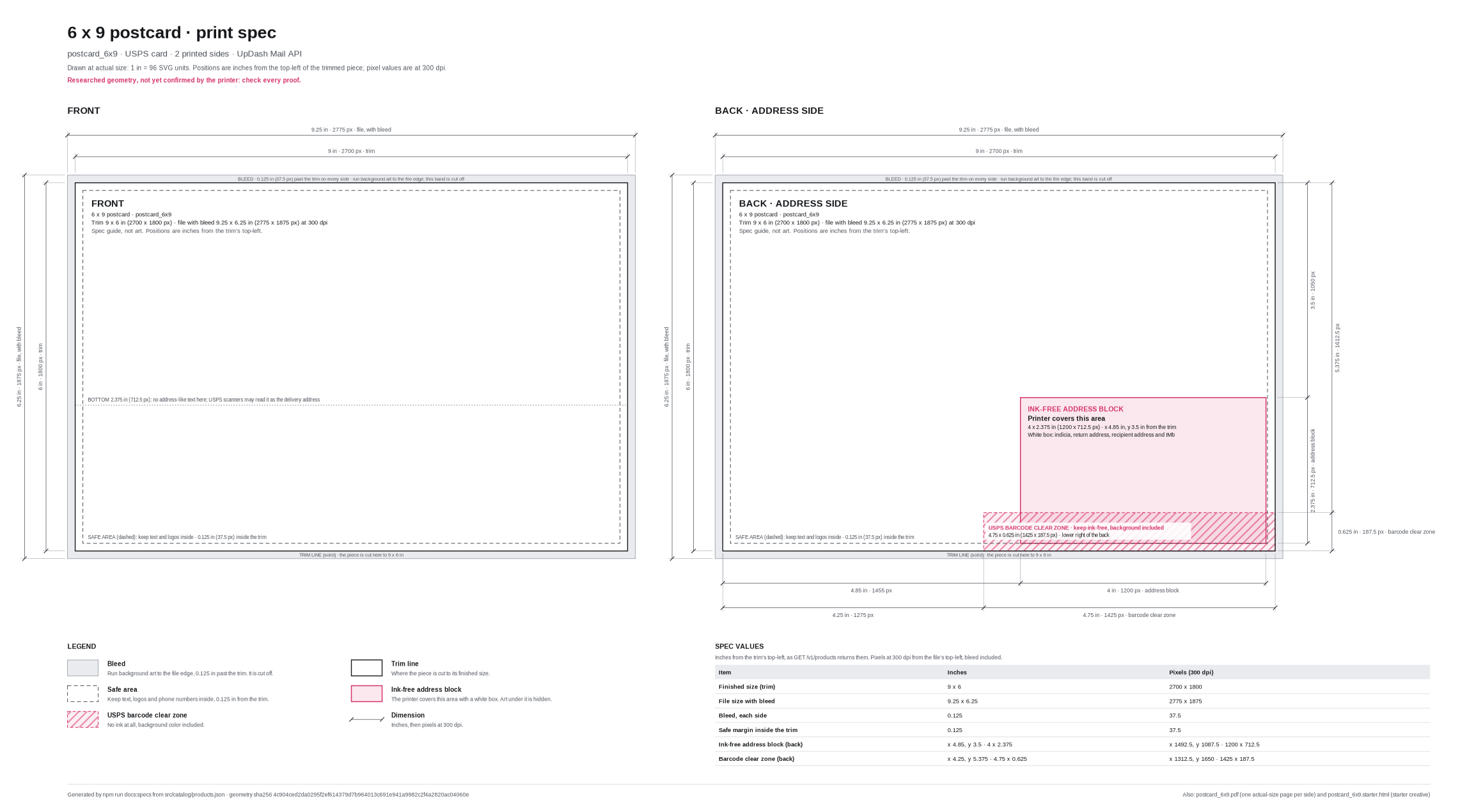
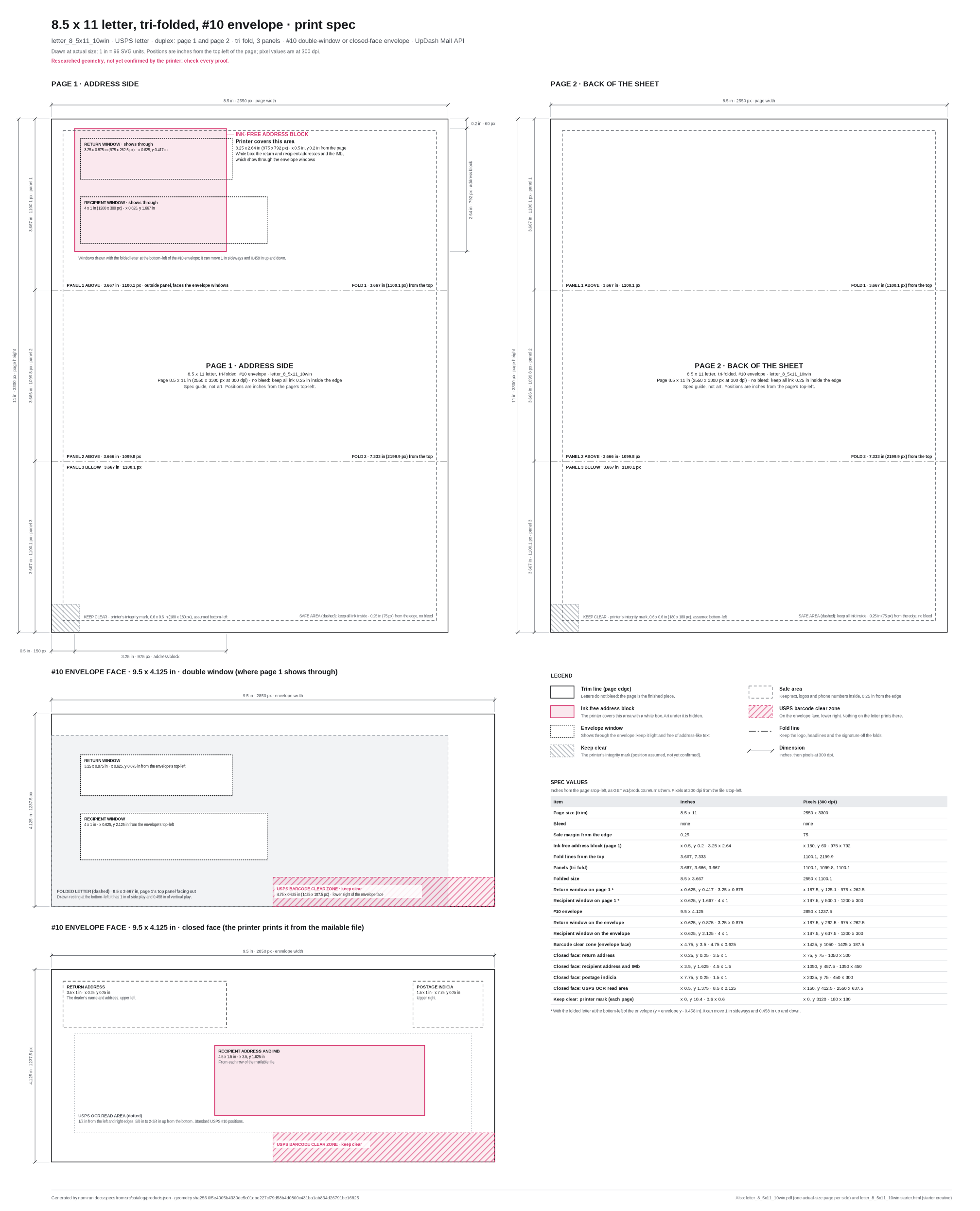
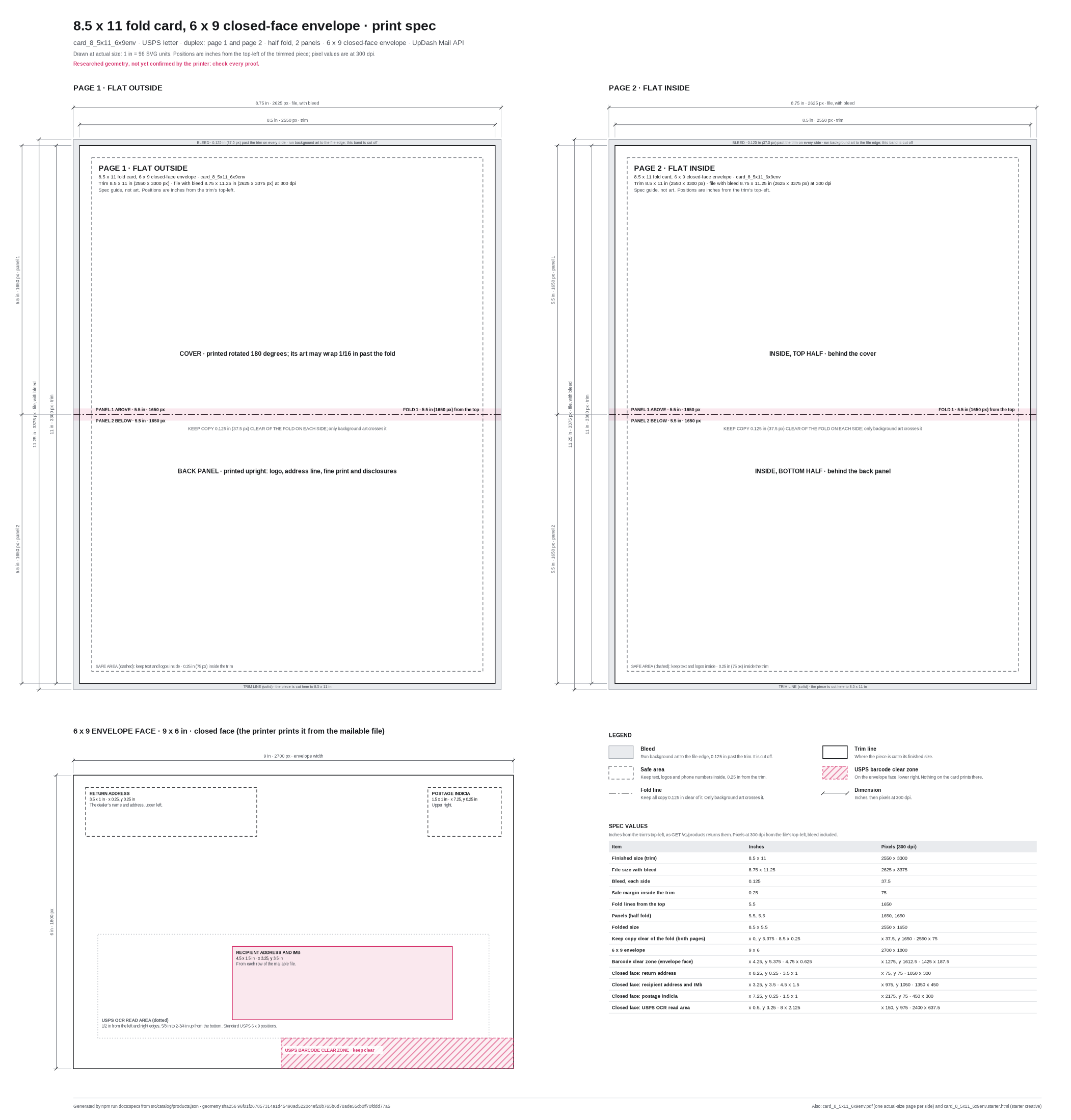
- Spec sheet (SVG): every printed side at actual size (1 in = 96 SVG units), side by side: the front and back of a postcard, page 1 and page 2 of a letter. It shows the trim, the bleed, the safe area, the ink-free address block ("Printer covers this area"), the USPS barcode clear zone, and for the letter the fold lines, the envelope windows as they fall on page 1, the printer's keep-clear corner and both #10 envelope faces: the closed face with its return address, recipient address, indicia and OCR read area, and the double window. Dimensions are in inches and in pixels at 300 dpi, with a legend and a table of every value.
- Actual-size PDF: one page per printed side at the file size (trim plus bleed: 9.25 x 6.25 in for the postcard, 8.5 x 11 in for the letter, 8.75 x 11.25 in for the fold card), with the same guides. Place it as a guide layer in your design tool, or print it at 100% to check a layout. It is a guide, not art. Its pages are the size and order that artwork must have (a PDF's pages, or the sides as images), so it doubles as the artwork guide: design over it, then hide it before you export.
- Starter creative (HTML): a minimal your own HTML creative that passes preflight. Download it (a browser shows it as an unstyled page with raw merge fields), send its contents as
htmltoPOST /v1/campaigns/{id}/creative(MCP:generate_creative), then change the copy and styling. Its CSS comments give the safe area and the ink-free areas in inches.
Pixel values assume a 300 dpi file measured from the file's top-left, bleed included. Inch values are measured from the trimmed piece's top-left, as GET /v1/products returns them.
The letter's spec sheet places the double-window envelope's windows on page 1 with the folded letter resting at the bottom-left of the #10 envelope. The folded letter can still move (1 in sideways, 0.458 in up and down), so keep anything near a window light and free of address-like text.
The files carry the same caveat as the specs: the printer has not confirmed this geometry.
Postcard
| Area | postcard_6x9 |
|---|---|
| Address block side | back |
| Address block position (x, y) | 4.85, 3.5 |
| Address block size (W x H) | 4 x 2.375 |
| Barcode clear zone | back, lower right, 4.75 x 0.625 |
| OCR read area on the address side | x 0.5 to 8.5, y 3.25 to 5.375 |
The address block sits 0.15 in from the right trim and 0.125 in from the bottom trim. The no-ink region on the back is the union of the address block and the barcode clear zone.
Design guidance:
- Extend background color and images to the bleed. Keep text, logos, phone numbers and offers inside the safe area.
- Keep the lower-right of the back clear: nothing under the address block or in the barcode clear zone.
- The address reads parallel to the long side (9 in).
- Do not put address-like promotional text in the bottom 2.375 in of the front. USPS scanners may read it as the delivery address.
- Corners are square, or rounded with a radius of at most 0.125 in.
- The
postcard_6x9card price applies only to Presorted or automation First-Class Mail, on stock 0.009 to 0.016 in thick and at least 75 lb basis. USPS Marketing Mail has no card price, so the 6 x 9 postcard mails First-Class only.
Letter
letter_8_5x11_10win is an 8.5 x 11 letter, tri-folded and mailed in a #10 envelope with no window (closed_face, the default). The printer prints each envelope from the mailing list, and page 1 prints the household's name and address as the inside address. A campaign that sends "envelope": "double_window" on create mails the same letter in a #10 double-window envelope instead: the return and recipient addresses on page 1 show through the windows (A letter's envelope). The product code keeps its old name, 10win, either way.
| Area | letter_8_5x11_10win |
|---|---|
| Fold | Tri-fold (C-fold), 3 panels |
| Folded size (W x H) | 8.5 x 3.667 |
| Address block | page 1, x 0.5, y 0.2, 3.25 x 2.64 |
| Barcode clear zone | Envelope face, lower right, 4.75 x 0.625 |
| Sheets | Up to 6 in a #10 |
The closed-face #10 (closed_face, the default) is 9.5 x 4.125 in with no windows. The printer prints each one from the mailing list at these places, measured from the envelope's top-left. They are standard USPS positions for a #10 (DMM 202.2.1, 202.5.1.1, 602.1.6 and 604.5.3.4), not the printer's own template:
| Area | x | y | W x H | Holds |
|---|---|---|---|---|
| Return address | 0.25 | 0.25 | 3.5 x 1 | The dealer's name and address, from the dealer profile version the creative printed, upper left. |
| Postage indicia | 7.75 | 0.25 | 1.5 x 1 | The indicia for the order's mail class, upper right. |
| Recipient address | 3.5 | 1.625 | 4.5 x 1.5 | The household's address block with its Intelligent Mail barcode (IMb). |
| OCR read area | 0.5 | 1.375 | 8.5 x 2.125 | Where USPS reads the address: 1/2 in from the left and right edges, 5/8 in to 2-3/4 in up from the bottom. The recipient address sits inside it. |
| Barcode clear zone | 4.75 | 3.5 | 4.75 x 0.625 | Kept empty. |
In a closed-face envelope, page 1 of the letter still prints the household's name and address in the address block, as the inside address and without an IMb. The printer prints the letters and the envelopes from the same mailing list and matches each letter to its envelope by the row key. Since no window shows page 1, its address only has to fit the address block, so a long address fits more easily than in the window (Address fitting).
The double-window #10 (double_window) is the same 9.5 x 4.125 in envelope with two windows, measured from the envelope's top-left. The return and recipient addresses print on page 1 and show through them, so the envelope itself is not printed:
| Window | x | y | W x H |
|---|---|---|---|
| Return address | 0.625 | 0.875 | 3.25 x 0.875 |
| Recipient address | 0.625 | 2.125 | 4 x 1 |
Design guidance:
- Letters do not bleed. Keep everything 0.25 in inside the edge.
- The page-1 address block (x 0.5, y 0.2, 3.25 x 2.64 in) is covered by the printer's white box. It is wide enough for the address areas print houses publish.
- In the default closed-face envelope nothing shows through, but design for the window anyway: the same creative can mail either way. Anything that shows through a window must be light in color and free of address-like text. A logo beside the address box is fine.
- Keep the bottom-left 0.6 x 0.6 in of every page clear for the printer's integrity mark.
- In a double-window envelope, the USPS window rules apply: at least 1/8 in of clear space between the address block and every window edge as the insert moves, the address on white or very light paper, and the address window's bottom edge at least 1/2 in from the envelope bottom.
- The barcode clear zone is on the envelope, not the letter, so the proof does not draw it.
Fold card
card_8_5x11_6x9env is one 8.5 x 11 sheet of card stock, printed on both sides and folded once in half to 8.5 x 5.5 in, landscape, with the fold at the top of the folded card (The fold card). It mails in a 6 x 9 closed-face envelope, which is letter-size mail: at most 6-1/8 in high, aspect ratio 1.5.
| Area | card_8_5x11_6x9env |
|---|---|
| Page 1 | The flat outside: the cover rotated 180 degrees in the top half, and the back panel upright in the bottom half |
| Page 2 | The flat inside, read top to bottom across the fold. It backs up page 1 on the long edge. |
| Fold | Half, at y = 5.5 in. Keep copy clear from y 5.375 to 5.625 in on both pages. |
| Address block | None on the card: the printer prints the address on the envelope and matches the two by row key |
| Barcode clear zone | Envelope face, lower right, 4.75 x 0.625 |
The printer prints each envelope from the mailing list at these places, measured from the envelope's top-left. They are standard USPS positions worked out for a 9 x 6 in piece, not a printer's template:
| Area | x | y | W x H |
|---|---|---|---|
| Return address | 0.25 | 0.25 | 3.5 x 1 |
| Postage indicia | 7.25 | 0.25 | 1.5 x 1 |
| Recipient address and IMb | 3.25 | 3.5 | 4.5 x 1.5 |
| USPS OCR read area | 0.5 | 3.25 | 8 x 2.125 |
The printer must confirm the stock, the fold, the envelope positions and the total weight. One sheet of 100 lb cover is about 0.58 oz and a 6 x 9 envelope adds about 0.3 to 0.45 oz, so the piece is close to 1 oz, which matters for First-Class. Prices are a placeholder pending the printer's quote.
Artwork specs
A print-ready artwork creative is either one PDF, with one page per printed side in print order, every font embedded, no JavaScript, forms, attachments or links, at most 50 MB, and every page within 0.01 in of the product's file size; or one PNG or JPEG per printed side (artwork.front and artwork.back), each at most 25 MB and 64 megapixels, with the page's proportions within 1%. The request refuses a file over its size limit or of the wrong kind; preflight checks the rest. To check art against a product before a campaign exists, use POST /v1/artwork/preview (MCP: preview_artwork), which returns the preflight and a review proof (Preview artwork).
| Product | Pages (in order) | Page size | Bleed | Safe area | Address side and block (from the trim's top-left) | Barcode clear zone | Guide |
|---|---|---|---|---|---|---|---|
postcard_6x9 |
2: front, back | 9.25 x 6.25 in (a 9 x 6 in trim) | 0.125 in on every side | 0.25 in from the page edge (0.125 in inside the trim) | Back: x 4.85 to 8.85 in, y 3.5 to 5.875 in (4 x 2.375 in); add the 0.125 in bleed for page coordinates | Back, lower right, 4.75 x 0.625 in against the right and bottom trim | |
letter_8_5x11_10win |
2: page 1, page 2 | 8.5 x 11 in | None | 0.25 in from the page edge | Page 1: x 0.5 to 3.75 in, y 0.2 to 2.84 in (3.25 x 2.64 in); the inside address in the default closed-face #10, and what shows through the windows of a double-window #10 | On the envelope | |
card_8_5x11_6x9env |
2: page 1 (the flat outside), page 2 (the flat inside) | 8.75 x 11.25 in (an 8.5 x 11 in trim) | 0.125 in on every side | 0.375 in from the page edge (0.25 in inside the trim) | None on the card: the printer addresses the envelope | On the envelope |
- Place the product's actual-size PDF as a guide layer. Export each page at the page size above with bleed only: no crop marks or slug. A larger page is a preflight error (
artwork_page_size), and its fix says when the page has a trim box of the trim size inside it (crop marks or a slug). - Extend background color and images into the bleed on postcards. Keep text, logos, phone numbers and offers inside the safe area.
- Keep the address block, and on postcards the barcode clear zone, free of anything that must be seen. The printer covers the block with a white box and prints the return address, the recipient's address and the barcode there; preflight cannot check what the art puts under it, so check the review proof, which draws both areas.
- Place images at 300 ppi or more at their printed size.
- Images instead of a PDF: send each side at the page size above, bleed included, at 300 ppi or more: 2775 x 1875 px for the 6 x 9 postcard (front and back), 2550 x 3300 px for the 8.5 x 11 letter and 2625 x 3375 px for the fold card (page 1 as
front, page 2 asback). Below that is the warningartwork_low_resolution; other proportions are the errorartwork_page_size. Each image is placed at the exact page size without resampling, a JPEG's colors (CMYK, RGB or gray) stay as sent, and a PNG's transparent pixels print white. - The letter: keep the bottom-left 0.6 x 0.6 in of every page clear for the printer's mark, and anything that would show through a window light and free of address-like text, as for HTML (Letter). The guide PDF draws the fold lines.
- Send one PDF with every side, or one image per side, never both. A PNG or JPEG sent as the one PDF is refused (415
artwork_not_pdf), and a PDF sent as a side (415artwork_not_image). TIFF, WebP, GIF and SVG are not accepted.
Mail classes
| First-Class Mail | USPS Marketing Mail | |
|---|---|---|
mail_class value |
first_class |
marketing_mail |
| Products | All three | The letter and the fold card; the 9 x 6 postcard mails First-Class only |
| Presort minimum (every product) | 500 pieces | 200 pieces (or 50 lb) |
| Below the minimum | Single-piece postage | Marketing Mail switches to First-Class, or joins a weekly pooled run, by Xcel's setting; First-Class costs the same per piece at any quantity |
A postcard is quoted First-Class; a letter or fold card defaults to Marketing Mail. See Quotes and approvals for how small runs are handled.
Values not confirmed by the printer
Xcel's print partners have not signed off on these specs yet, so every product has confirmed_by_printer: false. The specs come from the USPS Domestic Mail Manual and from print houses' published templates. These points are open:
| Product | Open question |
|---|---|
| All | The printer's own templates may differ from the researched geometry. |
postcard_6x9 |
Whether the printer's stock calipers at or under 0.016 in. The First-Class card price depends on it. |
postcard_6x9 |
The address-block size. Print houses publish different areas; the spec uses the largest, 4 x 2.375 in. |
postcard_6x9 |
The address block extends 0.35 in past the right edge of the USPS OCR read area, so the printer must set the address lines inside the read area. |
letter_8_5x11_10win |
Whether the printer can address closed-face envelopes, the letter's default, and match them to their letters by row key, and where it prints the return address, the recipient address and the indicia on its envelope stock. The closed-face areas above are standard USPS positions. |
letter_8_5x11_10win |
For a double-window order: the envelope windows are a standard #10 double-window. The printer's envelope must match them, or the address block must move. |
letter_8_5x11_10win |
Where the printer puts its integrity mark (assumed bottom-left). |
letter_8_5x11_10win |
Whether First-Class postage rises per ounce over 1 oz at the maximum sheet count. Weigh a sample before quoting First-Class. |
letter_8_5x11_10win |
The folded height of 3.667 in assumes three equal panels. In a C-fold the inner panel is usually shorter. |
card_8_5x11_6x9env |
The stock (100 lb cover is assumed), whether it needs scoring, and the fold. |
card_8_5x11_6x9env |
The imposition: the cover rotated 180 degrees in the top half of page 1, the back panel upright below it, and page 2 backing up on the long edge. |
card_8_5x11_6x9env |
The envelope positions, and that the printer can match each printed envelope to its card by row key. |
card_8_5x11_6x9env |
The finished weight, close to 1 oz with the envelope, and whether a folded cover-weight sheet is machinable. Weigh a sample before quoting First-Class. |
card_8_5x11_6x9env |
Its print and postage prices, which are a guess. |
Until the printer confirms these, treat the geometry as a careful starting point, and check every proof.